Moving from Maple?
Maple is closing on December 31.
Here’s an easier place to land.
Voonza reads the school emails you already get and turns them into your family’s calendar, so you don’t retype your schedule into yet another app.
Start free →3 months free · no credit card required
Before December 31
What to save from Maple.
Maple says all data will be deleted when it shuts down, with no way to recover it. Whichever app you move to, these are worth doing first:
Your calendar
If you used Maple+ calendar sync, your events are already in your Google, Apple or Outlook calendar. If not, screenshot or write down each kid’s recurring activities: the day, time and place.Lists and notes
Copy them out by hand or screenshot them. Nothing exports them.Shared documents
Download any files you stored or shared in Maple, such as forms, schedules and photos, and keep them somewhere of your own.
Do it by December 31, 2026. Annual Maple plans won’t renew; monthly plans stay active until that date.
Bringing your schedule to Voonza
Getting set up takes about ten minutes.
Voonza doesn’t import from Maple. Here’s what setting up looks like instead:
- Connect Gmail, and the school and activity items start arriving on their own.
- Add each kid’s activities in a minute: type them, say them, or photograph the schedule or camp confirmation.
- Invite your partner whenever you’re ready.
School email
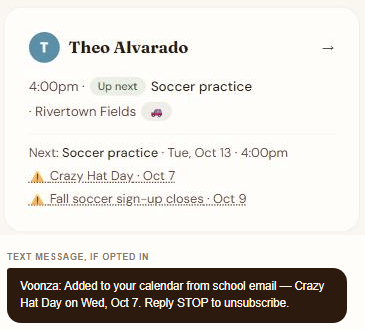
Your school emails become the calendar on their own.
Crazy Hat Day was one line in paragraph four of a long school newsletter. Voonza read it, put it on the family calendar, and — if you opt in to texts — told you. Connect Gmail once and the dates, deadlines and forms keep arriving without anyone typing them.
Both parents
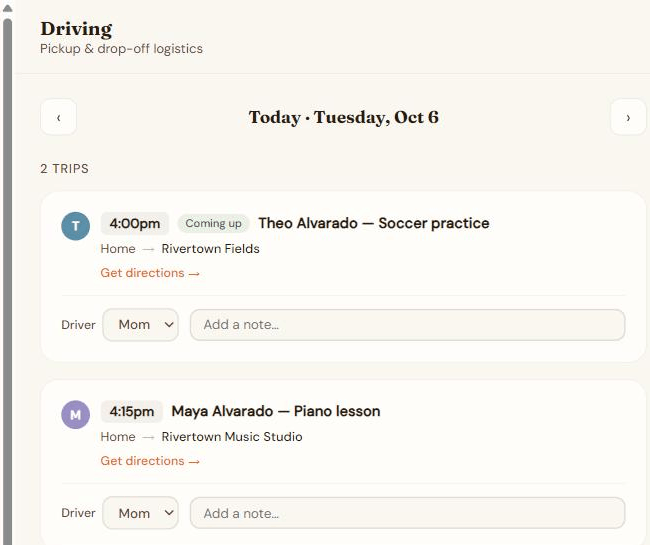
Both parents see the same week.
Invite your partner once and you share one family: the same schedule, the same reminders, and who’s driving to each pickup. Nobody has to forward anything or keep a second calendar in sync.
Ask Voonza
Change plans by just saying so.
When a lesson moves, tell Ask Voonza instead of editing a form. Type it or say it; Voonza confirms the change before it saves anything.
A real exchange on a demo family, unedited.
Questions from Maple families
Common questions
Is Maple really shutting down?
Yes. Maple’s own website says Maple has been acquired by Wander and will sunset on December 31, 2026. Annual Maple subscriptions will no longer renew; monthly subscriptions stay active until December 31, 2026.
What happens to my Maple data on December 31?
Maple says all data will be deleted when it shuts down and there will be no way to recover it. Save anything you want to keep before then (see what to save).
Can I move my Maple calendar to Voonza?
There’s no direct import from Maple. If you used Maple+ calendar sync, your events are already in your Google, Apple or Outlook calendar. In Voonza, connect Gmail and school items arrive on their own, and add each kid’s activities in a minute by typing or saying them, or by photographing a schedule or camp confirmation.
Does Voonza work on my phone?
Yes. Voonza runs in the web browser on any phone or computer, iPhone or Android, Mac or PC. There’s nothing to download from an app store.
What does Voonza cost after the free months?
The first 3 months are free with no credit card. After that it’s $9.99 a month for the whole family: unlimited children and both parents. Cancel anytime.
Try it free for 3 months.
No credit card. Then $9.99 a month for the whole family — unlimited children, both parents. Cancel anytime.
Start free →